
Walks that look like your life
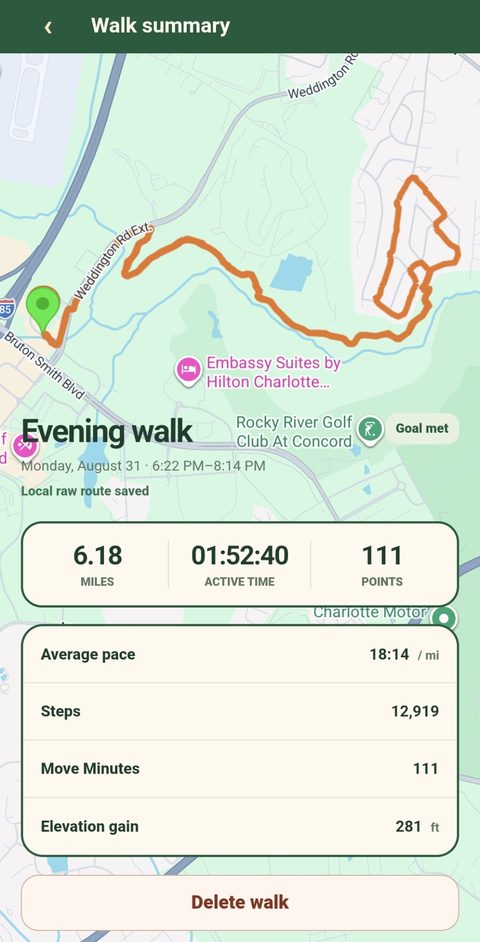
Lake loops, neighborhood streets, forest trails, rainy-day laps — One Foot maps it all on Google Maps and saves it to a history you can actually browse, not a feed you scroll past.
 One Foot
Beta testers needed
The daily walking streak app. GPS walk tracking, goals that fit your life, and a streak worth keeping — 281 days and counting.

One Foot is the walking tracker built for people who actually walk — every day, in real weather, on real streets and trails. No running pressure. No complicated training plans. Just GPS, streaks, and proof that you showed up.
One Foot turns an ordinary daily walk into a streak you want to protect. Goals, sub-goals, and trends keep it honest — rain gear counts, short walks count, every walk counts.
GPS tracking, history, and trends that work every single day. No account or subscription — your walk history stays on your phone, under your control.
If you’ve ever opened a fitness app and felt judged for “only walking,” you’re the person One Foot was built for — especially Gen X adults rebuilding consistency one day at a time.
Start with the essentials — track, save, see your streak. Stay for the trends that show how far a daily walk really takes you.
Lake loops, neighborhood streets, forest trails, rainy-day laps — One Foot maps it all on Google Maps and saves it to a history you can actually browse, not a feed you scroll past.
Tap start, put your phone away, walk. Route, distance, time and steps are recorded in the background. Indoor and stationary tracking coming soon.
A daily streak, plus smaller wins inside the day — like 3+ miles — so progress never feels all-or-nothing.
Weekly and monthly views that answer the only question that matters: “Am I actually doing this?” Yes. Here’s the proof.
Real screenshots from One Foot running on Android — no mockups. Dashboard, History, and Settings: that’s everything.


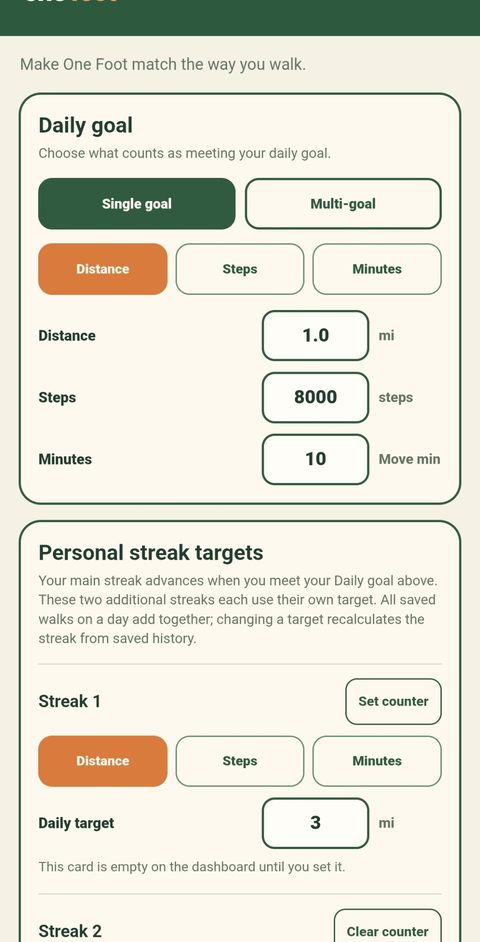
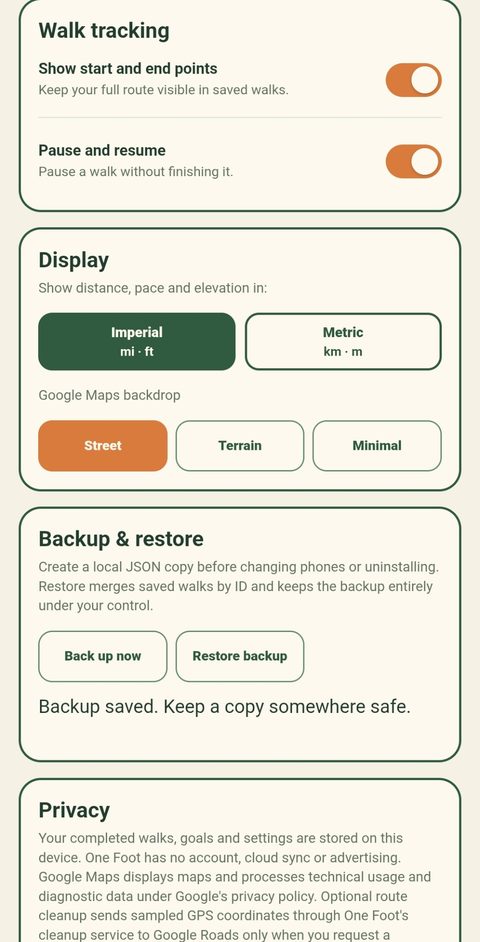
One Foot Beta 18 on Android — screenshots from the founder’s phone.

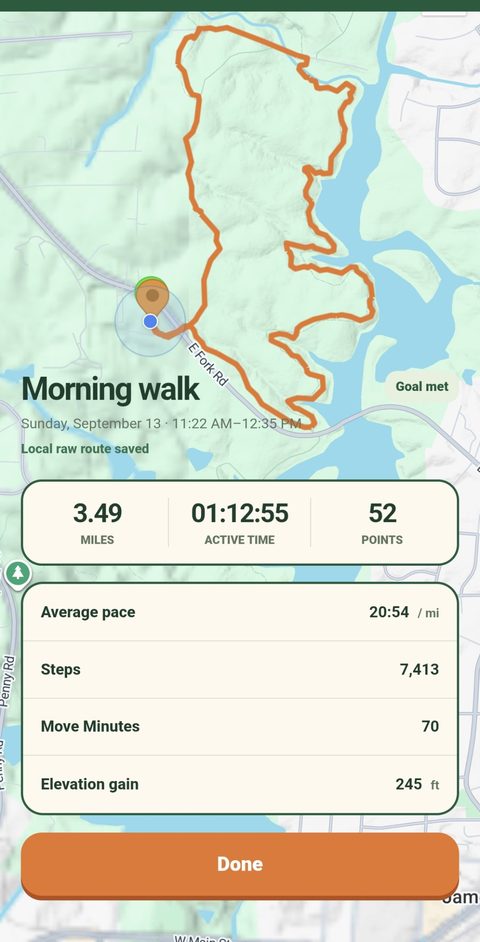
No account walls, no training-plan quiz, no wearable required. Here’s the whole setup, honestly.
Install from Google Play using your beta link. Allow location for your route and physical activity for steps. Android may also ask about notifications for your active walk.
Choose distance, steps, time, or a combination. Saved walks add together each day; your main streak advances when your daily goal is met. Two optional personal streaks use their own targets.
Start a walk, finish it, watch day 1 become day 2. One Foot keeps your history on your device — delete any walk anytime, or uninstall to remove app data.
One Foot grew out of Gen X Trekker — daily walks, reels, and a simple rule since December 30, 2025: walk every day, no “skip.” Rain means rain gear. The companion Facebook group, One Foot Forward: The Daily Walking Streak Group, is where walkers post their daily proof and where tester recruitment will begin.
The app and the community do the same job two ways: make today’s walk feel worth doing, and make tomorrow’s walk easier to start.
Request closed-beta access, stay opted in for 14 days, and try One Foot on your normal walks.
We’re inviting Android users to help test One Foot before its public launch. If you can stay opted in for two weeks, try it on your normal walks and share honest feedback, request access below.
The form asks for your name, Google Play account email and confirmation of beta eligibility and email permission. Your Google account does not need a Gmail address.
The Android closed beta is available to approved testers through Google Play. Tap Join the beta test to request access and receive the joining steps after approval. There is no public Android or iPhone launch yet.
Join through the Play tester link and stay opted in continuously for at least 14 days. Install One Foot, try it on your normal walks and share feedback. Submitting the signup form does not enroll you in Google Play testing. Short check-ins help: did the walk save, did the map look right, anything confusing?
No. One Foot never asks you to run or jog. It tracks walking — GPS route, steps, time, distance — and builds streaks, goals and trends around consistency.
Your walk history is stored on your device so you can view walks, streaks and trends. You can delete individual walks anytime in the app; uninstalling removes the app’s stored data on that device. One Foot does not currently offer an automatic retention-period setting.
The separate Activity Test build also offers optional sharing of selected activity through Android Health Connect. Sharing starts off; copies in Health Connect or another app must be managed separately. This is not yet in the current Play beta. See our privacy policy for the data types and controls.
No. Your phone’s GPS and step sensors are enough. One Foot is designed to be a one-tap, phone-in-pocket walking companion.
One Foot is made by the creator of Gen X Trekker — a daily walking streak project and Facebook community — as a family-built app for everyday walkers.
Contact us at onefootapp@gmail.com · Privacy policy · Beta feedback